Versatrans e-Link Calendar : Maintaining the e-Link Calendar : Editing and Deleting Calendars : Navigating the Manage Calendars Screen

Navigating the Manage Calendars Screen
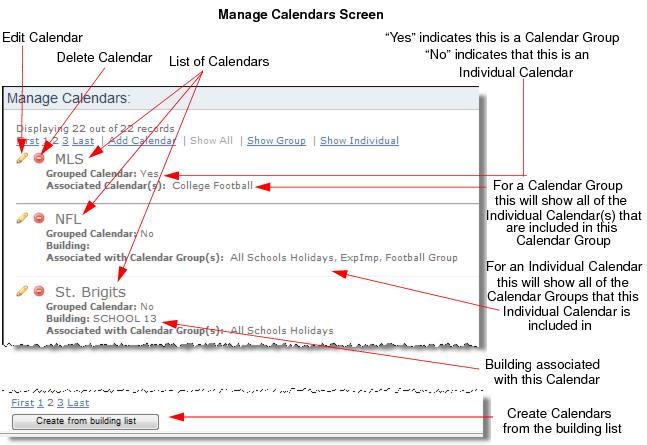
The Manage Calendars screen contains a list of calendars, as well as options to edit and delete calendars. This screen is only available to users if their User Group has the “Display Calendar” permission checked. See, Selecting Calendar Options for a User Group.
1.
Path:) Calendar > Manage Calendars
Users with the appropriate calendar permissions can create calendars from the building list. See, Associating Calendars to All the Buildings in Routing & Planning.
Add Calendar
Users with the appropriate calendar permissions can add calendars. See, Adding an Individual Calendar.
Show All
Shows all the calendars in the dataset.
Show Group
Displays only the Calendar Groups in the dataset.
Show Individual
Displays all of the Individual Calendars in the dataset.
Grouped Calendar (Yes or No)
If the calendar is comprised of a group of calendars “Yes” will display. If the calendar is an Individual Calendar “No” will display.
Building
Displays the building an Individual Calendar is associated with.
Associated with Calendar(s)
For Individual Calendars, this will display the Calendar Groups that the Individual Calendar belongs to.
Associated Calendar(s)
For Calendar Groups, the list contains Individual Calendars included in the group.