The Manage Calendars screen is only available to users if their User Group has the “Modify Calendars” permission checked. See, Assigning Calendar Options & Associating Calendars with a User Group.
 next to the calendar that you want to edit and the following panel displays.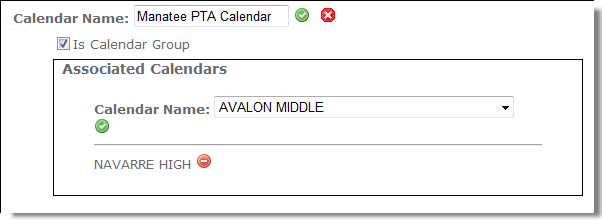
|
Tip:
|

|
4.
|
 next to the Individual Calendar that you want to remove.
|
6.
|
You can uncheck the Is Calendar Group box and this will change the Calendar Group to an Individual Calendar and remove the association of the selected Individual Calendar(s) to the Calendar Group.
|
|
7.
|
If you want the calendar to be associated with a building, uncheck the Is Calendar Group box and click the Building drop-down button to display a list of buildings and select a building.
|
|
8.
|
To associate additional Individual Calendars to the Calendar Group, click the Calendar Name drop-down button to display a list of calendars and select a calendar.
|
 next to the calendar name to insert and save the calendar changes.